Pending Transactions: What Balance Should You Use Before Payday?
Your bank app may show a current balance, an available balance, and a list of pending charges. Those numbers can disagree for several days. If you start a paycheck budget with the wrong one, you can overstate what is safe to spend. If you subtract the same pending charge twice, you can understate it.
The fix is not a more complicated budget. Give every charge one place in the calculation.
Use each charge once: either it is already reflected in your available balance, or it belongs in bills due before payday.
Then enter the four totals in the free paycheck budget calculator. It runs without a signup or bank connection and keeps the amounts in your browser.
Start with the balance you can actually use
Many banks use current or posted balance for transactions that have fully posted, while available balance often reflects pending debit-card charges too. Bank definitions and processing rules vary, so read the explanation in your own banking app.
A practical starting rule is:
- Use the available balance when it already includes the pending card charges shown in the app.
- Do not subtract those pending charges again.
- Include an autopay, check, or scheduled transfer in bills due if it is committed but not yet reflected in the available balance.
- Do not count a pending deposit until the money is available to use.
Truist's posted-versus-available balance explainer gives a common example of this distinction. Your bank may label or process items differently, so its own balance details remain the source to check.
A pending-transaction example
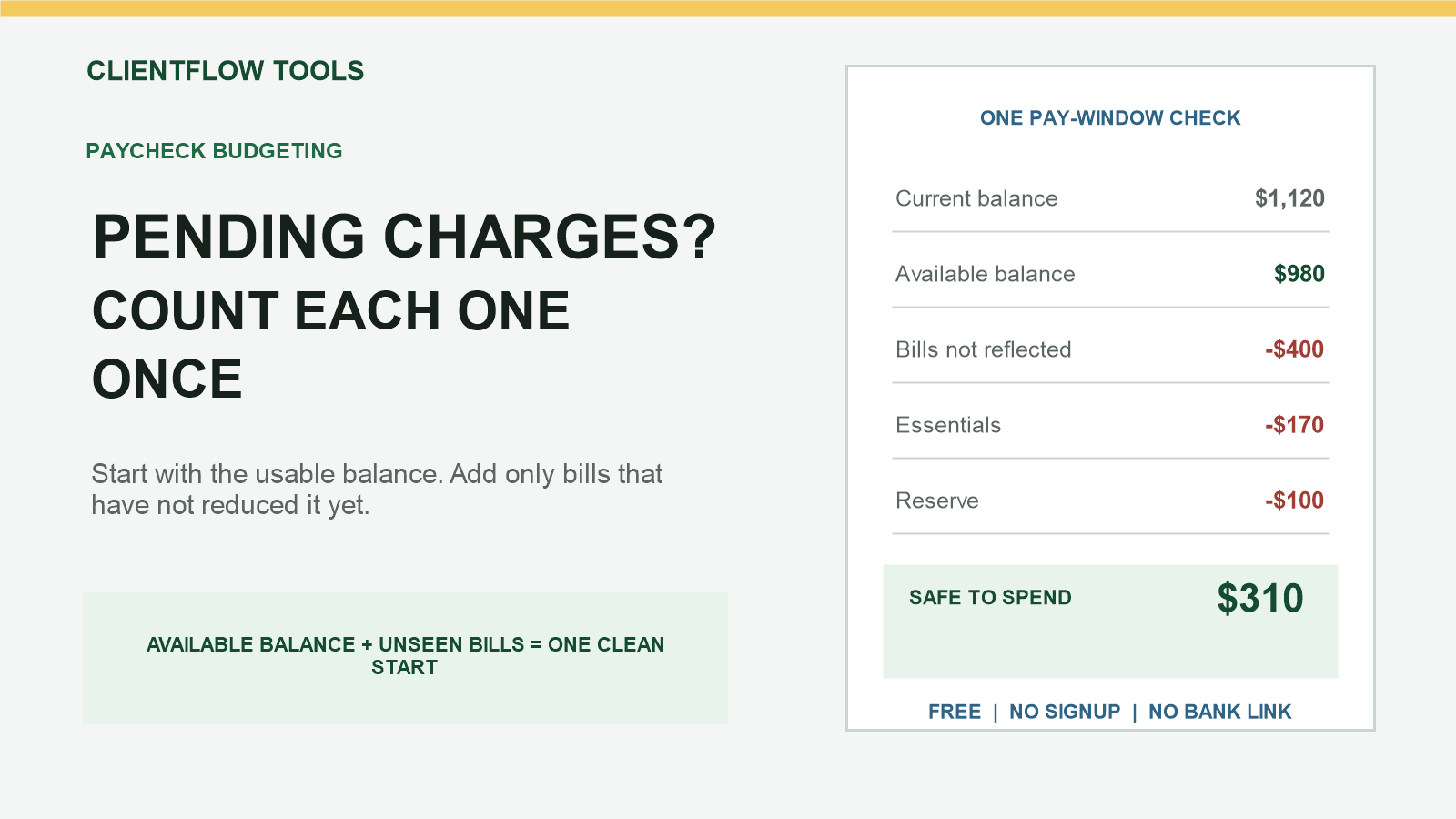
Suppose the bank app shows a current balance of $1,120 and an available balance of $980. The $140 difference is a debit-card purchase already reflected in the available balance.
You also have a $60 phone autopay that has not appeared yet. Together with the other unpaid bills before payday, bills due total $400.
| Available balance | $980 |
| Unpaid bills not reflected yet | -$400 |
| Essentials needed before payday | -$170 |
| Reserve left untouched | -$100 |
| Safe-to-spend ceiling | $310 |
$980 - $400 - $170 - $100 = $310
The $140 card purchase is not listed again because the available balance already accounts for it. The $60 autopay is inside the $400 bill total because it has not reduced the available balance yet.
The one-charge, one-subtraction check
Before calculating, scan each pending or scheduled item and ask one question:
Has this amount already reduced the starting balance I am using?
- If yes, leave it out of the bill total.
- If no, include it once when it is due before the next paycheck.
- If you cannot tell, verify the available-balance definition or transaction details with your bank.
This is also useful for card holds. A restaurant tip, gas-station authorization, hotel deposit, or corrected purchase amount may change before posting. Use the amount currently reflected, keep a reserve for uncertainty, and recalculate when the final amount posts.
What to enter in the calculator
- Money available today: the usable balance after checking what pending items it already reflects.
- Bills due before payday: unpaid commitments inside the pay window that are not already reflected in that balance.
- Essentials: groceries, transport, medicine, and other basics still needed before payday.
- Reserve: money intentionally left untouched for errors, holds, or surprises.
The CFPB's recent report on consumer overdraft experiences identifies payment timing, balance information, and unexpected automatic deductions as recurring problems. Its bill calendar can help you list upcoming due dates before running the numbers.
Recalculate when the bank changes the picture
A safe-to-spend result is a snapshot, not a guarantee. Run it again when:
- a pending amount changes or posts;
- an autopay appears;
- a deposit becomes available;
- a new bill enters the pay window; or
- the next pay date changes.
When the result is negative
A negative result is a shortage signal. It does not decide which bill to skip or provide overdraft, credit, or debt advice. Confirm the amounts, contact the companies involved, and use a reliable prioritizing-bills resource for your situation.
Run the free live calculator for the current pay window. To enter individual bill names and dates, separate current and next pay windows, and save the plan locally, use the Two-Payday Bill Planner.
This article is for general educational organization only. It is not financial, legal, tax, debt, banking, or payment advice. Verify balances, holds, pending items, due dates, and processing rules with your bank and billers.


Comments
Post a Comment